/

Quick Menu & Icon Design

Quick Menu & Icon Design
Mobile Banking App · Thai Major Bank (5M users) | Aug–Oct, 2024
Mobile Banking Application | User Research
& Product Design | Aug-Oct, 2024

Role & COntribution

role

UI/UX Designer Intern

Team

Me, 1 Mentor, 1 UX Writer, PMs, Devs, QAs, Cross‑functional stakeholders

+ Engineers + QA + Stakeholders

Duration

3 months (Aug–Oct 2024)

Skills Applied

User & Market Research / Mobile Design / Multi-Platform UX / Design Systems / Developer Handoff

Core Responsibilities

• Led UX from research → prototyping → testing → handoff → UAT

• Led UX from research → prototyping → testing → handoff → UAT

• Conducted 8 interviews + 42 surveys (N=50)

• Conducted 8 interviews + 42 surveys (N=50)

• Designed cross-platform icon system (4 slots, adaptive sizes )

• Designed cross-platform icon system (4 slots, adaptive sizes )

• Ran 2 rounds Maze Usability testing

• Ran 2 rounds Maze Usability testing

• Delivered Figma Dev Mode specs and weekly decks to stakeholders

• Delivered Figma Dev Mode specs and weekly decks to stakeholders

Project Details

Quick

Quick

Quick

menu

menu

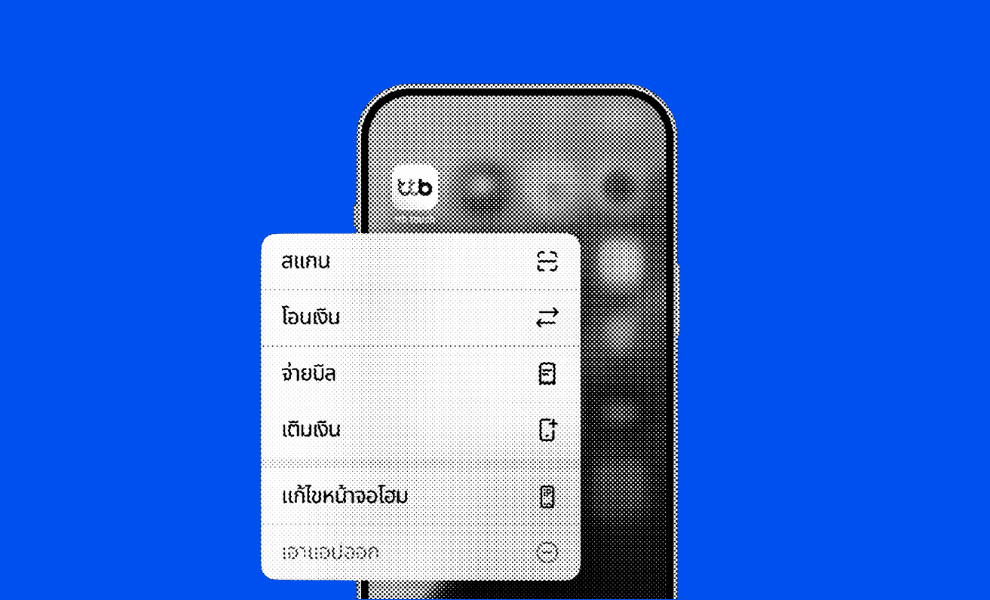
If you've ever pressed and held an app icon on your phone and seen a list of shortcuts pop up—that's it!


First introduced through 3D Touch on iOS in 2015, are now common across major apps (Instagram, X, Grab, LINE MAN, etc.)

Although optional, Quick Menus improve user flow efficiency by moving key actions from deep app navigation to your home screen help reduce the "Time-to-Value" for frequent tasks like Scan or Top Up
Current Flow
Current Flow
step 01

Unlock phone

step 02

Open app

(splash)

step 03

Authenticate

step 04

Reach home

step 05

Find feature

step 06

Re‑authenticate when finished

Problems

• 6+ taps in public, often crowded environments

• Duplicate flow for the same payment intent

• High cognitive load for users under time pressure

How might we streamline the high-value task so users can complete frequent payments with minimal steps and maximum trust?

How might we streamline the high-value task so users can complete frequent payments with minimal steps and maximum trust?

How might we

streamline the high-value task so users can complete frequent payments with minimal steps and maximum trust?

step 01

Unlock phone

step 02

Open app

(Splash screen)

step 03

Authenticate

(Password)

step 04

Navigate to Home screen

step 05

Find feature

step 06

Re‑authenticate when finished

Current Flow
  • 6+ taps in public, often crowded environments

  • Duplicate flow for the same payment intent

  • High cognitive load for users under time pressure

Problems

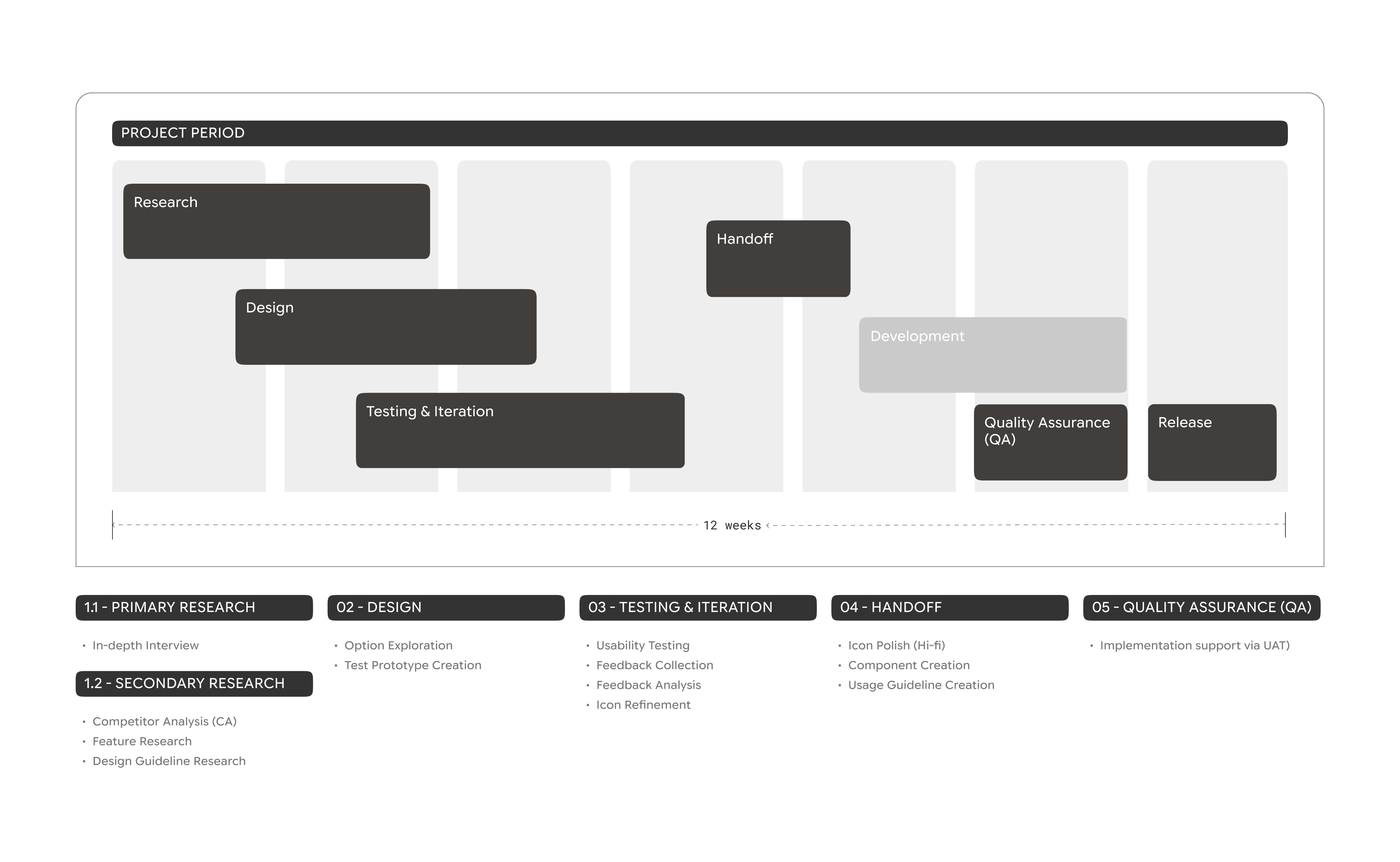
TIMELINE

APPROACH & PROCESS

Technical research
platform constraints

Mapped limits (max actions, system labels, icon formats) across devices and how they impact design and engineering

User research
behaviors & priorities
  • 8 in‑depth interviews (45–60 minutes) with heavy and occasional users

  • 42 surveys to rank “hero features” for a limited 4‑slot menu

Market research
competitive landscape
  • Audited 10+ Thai banking and fintech apps (K PLUS, SCB EASY, Grab, etc.)

  • Compared Patterns, Icon, Flow, Copy, and Authentication models

Ensure high contrast and readability in both Light and

Dark mode

Platform research

Key Design Considerations

To define quick menu design standards, I reviewed platform guidelines and analyzed existing implementations. This informed best practices for usability, performance, sizing, and visual alignment.

To define current widget design standards, I researched platform guidelines to informed best practices for usability, performance, sizing, and platform alignment.

To define current widget design standards, I researched platform guidelines to informed best practices for usability, performance, sizing, and platform alignment.

Device-based
  • Platform-specific rules

    and system behavior

Space
  • 1–4 actions

  • Used in fast,

    often public contexts

Icon Design
  • SF Symbols vs. Custom icons

  • Stroke consistency

  • Dark & Light Mode support

iOS

17+

iOS

17+

iOS

17+

Highlights
  • Slots: Typically 1–4 actions + system items (Edit Home, Remove App)

  • Must remain legible at very small sizes in both light and dark modes

Android

14+

Android

14+

Android

14+

Highlights
  • Flexible, typically 4–5 actions

  • Material Design with solid colors and adaptive icons

Approach

Uses unified stroke weights with system items and iconography that matches in-app design while remaining instantly recognizable at a glance for its function

User Reseach

Mixed-Methods (N=50)

• 8 in‑depth interviews (45–60 mins) with heavy vs. occasional users

• 42 surveys to understand the user journey, quick menu awareness, usage frequency, and user expectations

Target User Segments
1
Heavy Users
Key Pain Points
  • Use Scan / Transfer daily, often in public (convenience stores, transit)

  • Reported the full app as “too slow” for simple payments

  • Were frustrated by redundant authentication for small, frequent transactions

Solution
  • Reducing the time between intent and action

  • avoid unnecessary re‑auth when platform policy allows.

2
Occasional Users
Key Pain Points
  • Many didn’t know the Quick Menu existed

  • Needed clear, simple labels and a strong sense of control

Solution

Simplicity & clear visual cues

  • Single-tap activation 

  • brand-consistent visual hierarchy

Motivation
Motivation
Safety & Control

"Even I don’t use it all the time, having it just feels safer"

"Even I don’t use it all the time, having it just feels safer"

"Even I don’t use it all the time, having it just feels safer"

Speed

"The full app is too slow for

simple payments in public"

"The full app is too slow for

simple payments in public"

relevance

"Show only features

I actually need daily like Scan/Top Up"

"Show only features

I actually need daily like Scan/Top Up"

Challenge
Challenge
 High-value tasks

User preference vs. stats?

Speed vs. Trust

But is reduced authentication allowed under bank policy? Does it risk users’ trust?

Show Quick Menu to new users?
  • Empty menu frustrates new users (no accounts)

  • Hiding prevents discovery

* SolutionPost-account-verification reveal (after first login/setup) Balances adoption + zero-frustration
Show Quick Menu to new users?
  • Empty menu frustrates new users (no accounts)

  • Hiding prevents discovery

* SolutionPost-account-verification reveal (after first login/setup) Balances adoption + zero-frustration

Design Process

Design Process
Design Strategy

Week 1–3: Competitive audit (18 Thai banks/Fintech apps+ ttb flows)

Week 4–6: User research → BA discussions

Week 7–8: Platform/brand guideline review

Week 9–10: Hi-fi prototypes → Maze testing

Week 11: Icon polish → Dev specs

Week 12: Final handoff (later: implementation support via UAT)

Design Outcome

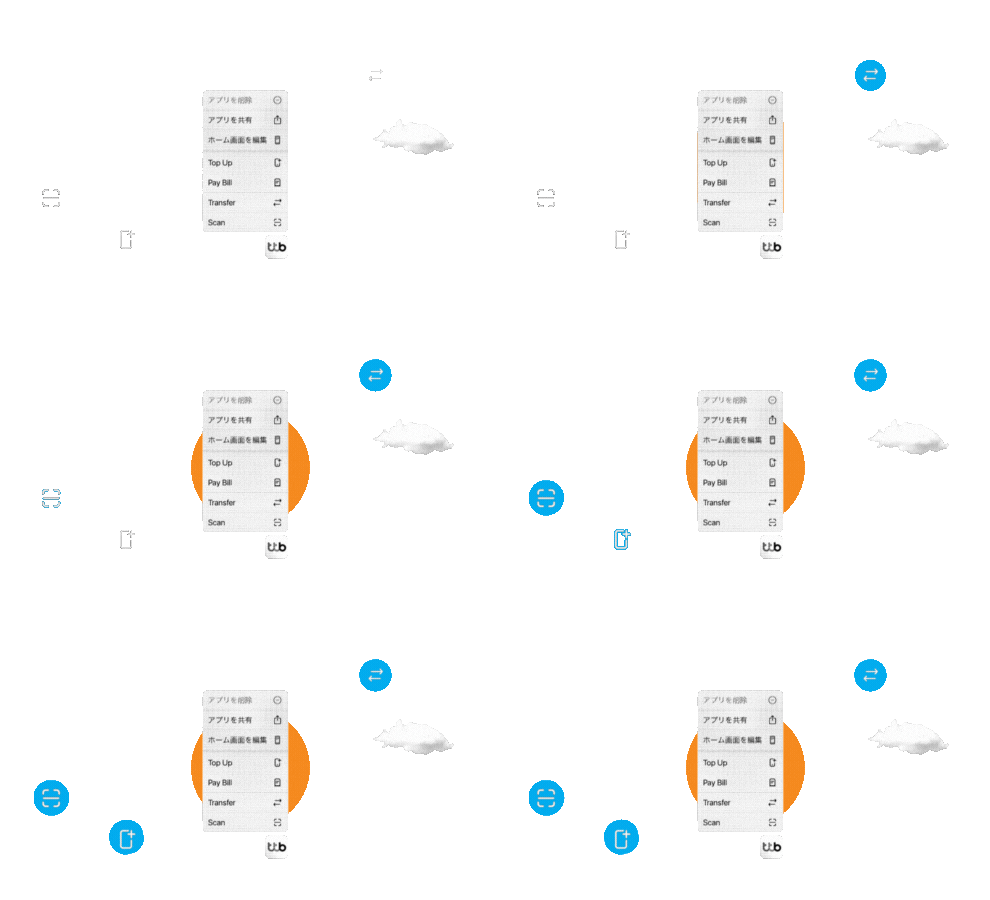
Final menu

The final menu balanced

To define current widget design standards, I researched platform guidelines to informed best practices for usability, performance, sizing, and platform alignment.

To define current widget design standards, I researched platform guidelines to informed best practices for usability, performance, sizing, and platform alignment.

1
Number of Items

Aimed at four actions based on platform limits and user preference

2
Action selection

Based on engagement data, research rankings, and competitor benchmarks

Final: Scan · Transfer

Pay Bill · Top Up

Based on engagement data, research rankings, and competitor benchmarks

Final: Scan · Transfer · Pay Bill · Top Up

3
Action order

Ordered using in‑app usage statistics and validated via testing

Ensure high contrast and readability in both Light and

Dark mode

Icon Design

Quick Menu icons are simplified versions of in-app icons, designed for clarity in a constrained context

iOS

SF‑inspired line icons that align with the bank’s visual language and Apple’s Human Interface Guidelines

Android

Circular icons with colored backgrounds for visual separation

* All icons support both dark and light mode and share a common grid and stroke system
Word Choices

I collaborated with a UX Writer to define concise, action-oriented copy that aligned with brand voice, layout constraints, and platform conventions

Final Labels:
Scan · Transfer · Pay Bill · Top Up


Avoided: Bill PayTopUpScan QR
Each word was carefully evaluated for clarity, consistency, and competitive differentiation

I collaborated with a UX Writer to define concise, action-oriented copy that aligned with brand voice, layout constraints, and platform conventions


Final Labels:
Scan · Transfer · Pay Bill · Top Up

Avoided: Bill PayTopUpScan QR
Each word was carefully evaluated for clarity, consistency, and competitive differentiation

I collaborated with a UX Writer to define concise, action-oriented copy that aligned with brand voice, layout constraints, and platform conventions

Final Labels:
Scan · Transfer · Pay Bill · Top Up

Avoided: Bill PayTopUpScan QR
Each word was carefully evaluated for clarity, consistency, and competitive differentiation

Before/After Flow
Traditional Flow (~20 seconds)
step 01

Home

step 02

Open app

(splash)

step 03

Authenticate

step 04

Reach home

step 05

Find feature

step 06

Start the Transaction

Start the transaction

step 07

Re‑authenticate when finished

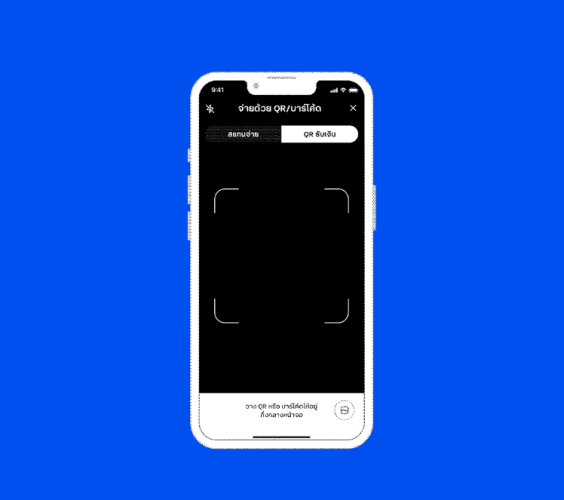
Quick Menu flow (~11 seconds)
step 01

Home

step 02

Long‑press

app icon

step 03

Open app

(splash)

step 04

Start the

transaction

step 05

Authenticate once to complete the transaction

 ≈ 45% TIME REDUCTION

in test scenarios
Summary

Key Deliverables
1
Weekly Progress Reports

Weekly presentations to >100 stakeholders

2
Competitive & User analysis

Benchmarking against the Thai banking and Fintech apps landscape

3
Final user flows & interaction maps

Comprehensive flows mapping all states: Splash, error handling, prospects (pre-signup), and authenticated users 

to 100+ cross-functional

team members

4
Hi-fi Design & Handoff
  • Dev-ready flows & assets for implementation

  • Icon and design system guidelines

1
Weekly Progress Reports

Weekly presentations to >100 stakeholders

2
Competitive & User analysis

Benchmarking against the Thai banking and Fintech apps landscape

3
Final user flows & interaction maps

Comprehensive flows mapping all states: Splash, error handling, prospects (pre-signup), and authenticated users 

4
Hi-fi Design & Handoff
  • Dev-ready flows & assets for implementation

  • Icon and design system guidelines

REFLECTION

Key learnings
  • User Insights Drive Innovation

Including user quotes (not just numbers) sparks discussion. Field research led to deep understanding, enabling confident answers to questions, turning user pain into solutions and stories into innovation

  • Everything Is Designed

Icon work showed me: every detail, from pixels to products, is intentionally designed. This project shaped how I think like a designer and learned to look out for little details

What could be improved
  • Testing environment gap

Maze conditions ≠ real-world scenarios

  • User pool bias

Limited recruitment users in Bangkok and with the 50 users sample couldn't fully represent 5M users' diversity

Want to learn more about my process? Let's Get in touch!
Want to learn more about my process? 
Let's Get in touch!

Designed & Made by Rujirekha

Designed

& Made by Rujirekha

神戸, Japan

Updated 02.24.2026

Updated 02.24.2026